
Grunt vs think-cell

The think-cell alternative that works with the AI your firm already uses.

Both build business charts in PowerPoint, linked to Excel. The difference: think-cell sells its own AI as an add-on, while Grunt works with the AI your firm already pays for: Claude, ChatGPT or Microsoft Copilot. And the same chart can be edited in PowerPoint, HTML apps and AI chats.


One of Norway's fastest-growing tech companiesTechnology Fast 50 · 2026

Used by teams at

KPMGBDOCBREAccentureDNBSantanderCushman & WakefieldPepsiCoThe Coca-Cola CompanySopra Steria

Which one fits your team?

think-cell fits when the work starts and ends in PowerPoint, and you want layout tools, a large slide library and an AI built into PowerPoint and Excel.

Grunt fits when AI is part of how your team works, and you want to build charts with Claude, ChatGPT or Copilot, keep every number linked to its source and use the same chart in PowerPoint, HTML reports and AI chats.

Switching from think-cell

Everything you use in think-cell. And more.

All the chart types you know from think-cell are in Grunt, from waterfalls and Mekkos to combined and Gantt charts. On top of that, Grunt gives you dumbbell, radar and index charts, financial tables and Visual Grids, with more on the way.

Everything you’re used to

Column
Bar
Waterfall
Line
Area
Combined
Mekko
Scatter
Bubble
Pie
Donut

Extra in Grunt

Dumbbell
Radar
Index line

Coming soon

Football field
Sankey
Coming soon

Bring your think-cell charts with you

A converter turns the think-cell charts in your existing decks into editable Grunt charts. Switching doesn’t mean rebuilding your work.

Book a demo

AI integration

Your AI already knows your business. Now it can present it.

think-cell comes with its own AI: one more AI to license, approve and roll out, sold in its higher-priced plans, and you can’t connect the one your team already uses. Grunt works with Claude, ChatGPT or Copilot, so your team builds charts with an AI that already knows your documents and data. If you switch AI tools later, your charts and decks stay as they are.

YOUR AIGRUNT MCPBOARD-READY OUTPUTClaudeChatGPTMicrosoft Copilot+ your documents and dataMCP server and skillsoakvale-q3.htmlOAKVALE · BOARD PACK Q3 2026Revenue has grown 9% a year since 20223 12020223 41020233 76020244 02020254 3802026CAGR +8.9%EBITDA margin21.4%Net debt / EBITDA1.8xLinked to source · v4PPTXHTMLSVGPNGYOUR AIClaudeChatGPTCopilotGrunt MCP · server and skillsoakvale-q3.htmlOAKVALE · BOARD PACK Q3 2026Revenue has grown 9% a year since 20223 12020223 41020233 76020244 02020254 3802026CAGR +8.9%EBITDA margin21.4%Net debt / EBITDA1.8xLinked to source · v4PPTXHTMLSVGPNG

Traceable numbers

AI decides what to show. Grunt keeps the numbers right.

Both tools link charts to Excel. Grunt adds what you need when AI is part of the work.

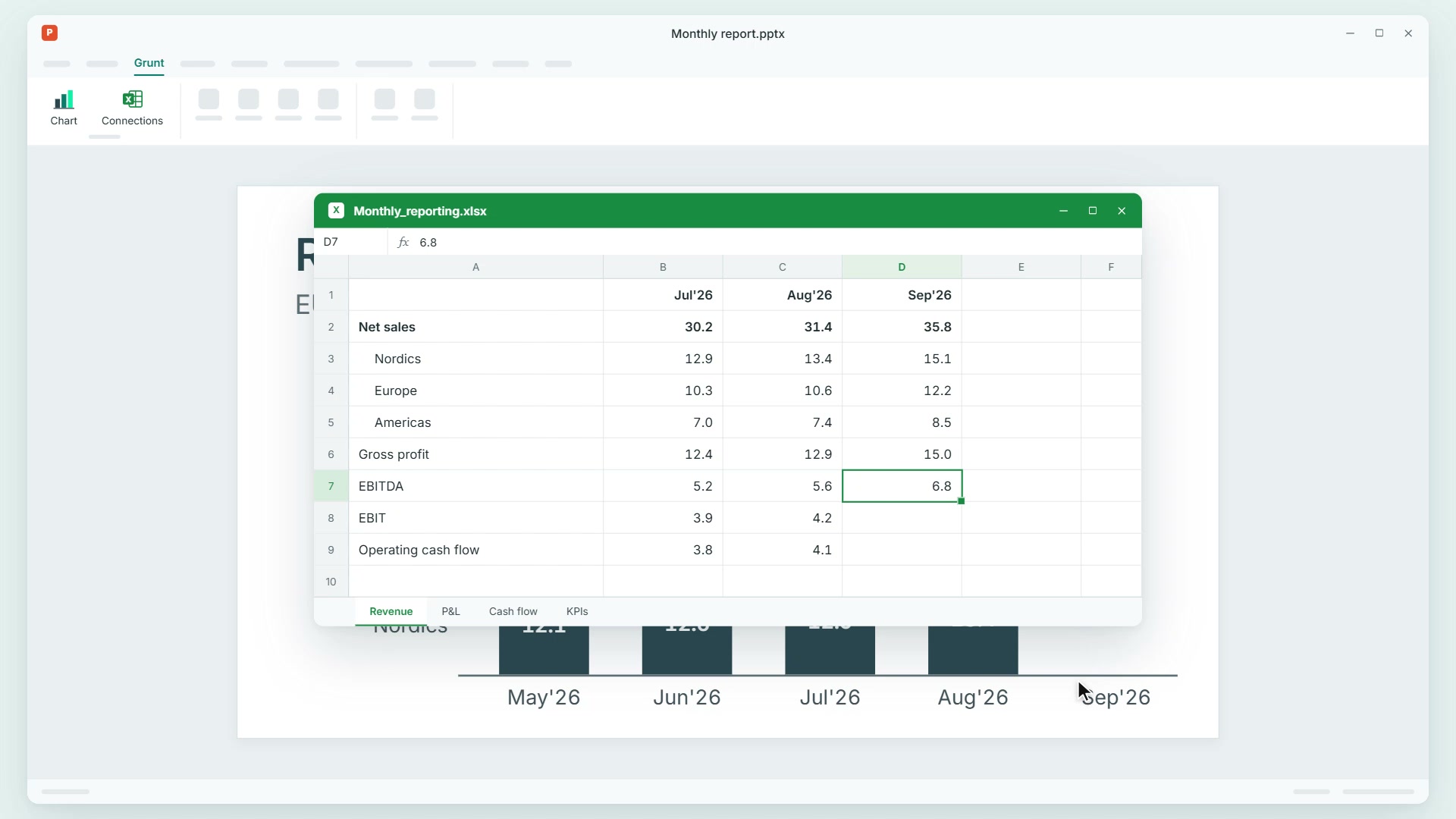
  • Refreshed in one clickCharts linked to Excel ranges in local files, SharePoint or OneDrive refresh from the source. No prompt, no tokens spent.
  • Every number shows where it came fromEvery chart shows its data and its source, so anyone can check it before it goes out.
  • Edit the numbers, keep the originalChange a figure in the Data Editor and reset it to the source value whenever you need to.
Portable charts

Build once. Edit anywhere.

A think-cell chart lives in PowerPoint. A Grunt chart can be opened and edited in AI chats, PowerPoint and HTML apps without rebuilding it, and every copy keeps its source and version.

One chart, one sourceEvery copy knows its source and version, so you never rebuild a chart to update it.
See what changedSee exactly what changed since the version you approved.
Update on your termsKeep the approved version, or adopt the latest.

Side by side

Here’s how the two compare, feature by feature.

Grunt and think-cell compared
Featurethink-cellGrunt
Whose AIIts own AI, Assist, inside PowerPoint and Excel. Customers can’t connect their own AI.Yours: Claude, ChatGPT or Microsoft Copilot, through Grunt’s MCP server and skills. With Claude for PowerPoint, it works right in the deck you have open.
AI usageSold in the AI Suite plans, at nearly twice the per-user price of Suite without AI, with usage limits.No extra AI license. Runs on the AI subscription your firm already has.
Where charts are editedPowerPoint.PowerPoint, Grunt Web Studio, HTML reports and AI chats. Export to PPTX, SVG, PNG and HTML.
Excel linksYes. Linked charts update from Excel.Yes. Excel ranges in local files, SharePoint or OneDrive. One click, no prompt, no tokens.
Chart types40+ chart types and variants.All the chart types you know from think-cell (column, bar, waterfall, line, area, combined, Mekko, scatter, bubble, pie, donut and Gantt), plus dumbbell, radar and index charts and Visual Grids. Football field and Sankey charts coming soon.
PlatformsWindows and Mac.Grunt for PowerPoint on Windows and Mac. Grunt Web Studio in the browser.
Security and hostingISO 27001 certified.ISO/IEC 27001:2022 certified information security management. Grunt-hosted on Microsoft Azure as standard, or hosted on your own infrastructure.
Trial30-day free trial.14-day free trial of Grunt for PowerPoint.

think-cell (now written thinkcell) as described on thinkcell.com, thinkcell Assist, thinkcell plans, checked 16 November 2026. think-cell is a trademark of its owner. Something out of date? Tell us.

Questions, answered

What is the difference between Grunt and think-cell?

Both build business charts in PowerPoint, linked to Excel. think-cell is a PowerPoint add-in with its own AI, Assist, inside PowerPoint and Excel. Grunt works with the AI your firm already uses, through its MCP server and skills, and a Grunt chart is built once and edited anywhere: in PowerPoint, Grunt Web Studio, HTML reports and AI chats.

Is Grunt an alternative to think-cell?

Yes. Grunt for PowerPoint gives you what you’re used to in think-cell: the same business charts, linked to Excel, with calculated annotations and layout tools. On top of that, Grunt works with your own AI, and the same chart can be edited outside PowerPoint.

Does think-cell work with Claude, ChatGPT or Copilot?

Not as the AI that builds the slides, as of 16 November 2026. think-cell says customers can’t connect their own AI services to Assist. Its MCP support works the other way: enterprise customers can connect internal sources to think-cell’s AI, set up case by case. Grunt works with Claude, ChatGPT and Microsoft Copilot.

Does Grunt have the same chart types as think-cell?

Yes, and more. All the chart types you know from think-cell are in Grunt: column, bar, waterfall, line, area, combined, Mekko, scatter, bubble, pie, donut and Gantt charts, with stacked, clustered and 100% variants. On top of that, Grunt gives you dumbbell, radar and index charts, financial tables and Visual Grids. Football field and Sankey charts are coming soon.

Can I convert my think-cell charts to Grunt?

A converter that turns think-cell charts into editable Grunt charts is coming soon, so switching won’t mean rebuilding your decks. Book a demo to hear more.

Does Grunt work on Mac?

Yes. Grunt for PowerPoint works in PowerPoint on both Windows and Mac, and Grunt Web Studio runs in the browser.

What does Grunt cost?

It depends on your team, the parts of Grunt you use, your roll-out and your hosting. You don’t license a separate AI for Grunt: it works with the AI your firm already pays for, and refreshing linked charts uses no AI at all. Request pricing or book a demo. You can also try Grunt for PowerPoint free for 14 days with just an email address.

Make AI deliver the deck.

See Grunt work with the AI you already use: business charts, every number traceable to its source, in PowerPoint, HTML apps and AI chats.